What is AWS Organizations?
AWS Organizations is a service provided by Amazon Web Services (AWS) that allows you to centrally manage and govern your environment as you grow and scale your AWS resources. You can create accounts in your organization and invite existing accounts to join the organization. AWS Organizations is particularly useful for large enterprises, educational institutions, and any business managing multiple AWS accounts. It helps in reducing administrative overhead, simplifying billing, improving security, and enforcing compliance across an AWS environment. Here are the key features and benefits of AWS Organizations:
- Centralized Management: It enables you to consolidate and manage multiple AWS accounts within a single organization created by you. This makes it easier to manage billing, control access, comply with regulations, and ensure security across all your AWS accounts.
- Account Structure and Organizational Units (OUs): You can group your AWS accounts into organizational units (OUs) within your organization. This hierarchical structure allows you to apply and manage policies more effectively across your accounts.
- Service Control Policies (SCPs): SCPs allow you to define and apply permission policies across your organization or specific OUs. These policies enable you to restrict what actions users and roles in your accounts can perform, enhancing security and compliance across your AWS environment.
- Consolidated Billing: AWS Organizations simplifies the billing process by enabling consolidated billing for all accounts within your organization. This means you receive a single bill for all your accounts, which can help you analyze costs and usage, and take advantage of volume discounts.
- Automated Account Creation and Management: It provides features to automate the creation and management of AWS accounts through APIs. This is useful for large organizations looking to automate their cloud governance framework.
- Cross-Account Resource Sharing: With AWS Organizations, you can easily share resources across accounts within your organization. This is useful for sharing common infrastructure or services, like S3 buckets or VPCs, reducing the need to duplicate resources.
- Enhanced Security and Compliance: By centrally managing access, permissions, and policies, AWS Organizations helps you maintain a strong security posture and ensure compliance with internal policies and external regulations.
- Tag Policies: You can implement tag policies to ensure uniformity in tagging across your organization’s accounts. These policies help in maintaining consistency in both the tags’ keys and their values, including the adoption of a standardized case format.
- AI Policies: You can implement AI services opt-out policies to exclude certain AWS artificial intelligence (AI) and machine learning services from data collection and storage. This allows you to select which AWS AI services should not gather or retain your data.
- Backup Policies: You can employ backup policies to set up and automatically assign AWS Backup plans to resources throughout your organization’s accounts, ensuring that automatic backups are configured for these resources.
- IAM Integration: AWS Identity and Access Management (IAM) offers detailed management of users and roles within specific accounts. AWS Organizations enhances this by extending control to the account level, allowing you to regulate the actions users and roles can perform across one or more accounts. The permissions that result from this setup are a combination of those permitted by AWS Organizations at the account level and those directly granted by IAM at the user or role level within the account. Essentially, a user’s access is limited to what is authorized by both AWS Organizations policies and IAM policies. If any one of these policies denies a particular operation, the user will not be able to perform that operation.
- Integration with AWS Services: AWS Organizations integrates with other AWS services, such as AWS CloudTrail, AWS Config, AWS CloudFormation, and many others, to provide a comprehensive solution for managing your AWS resources efficiently.
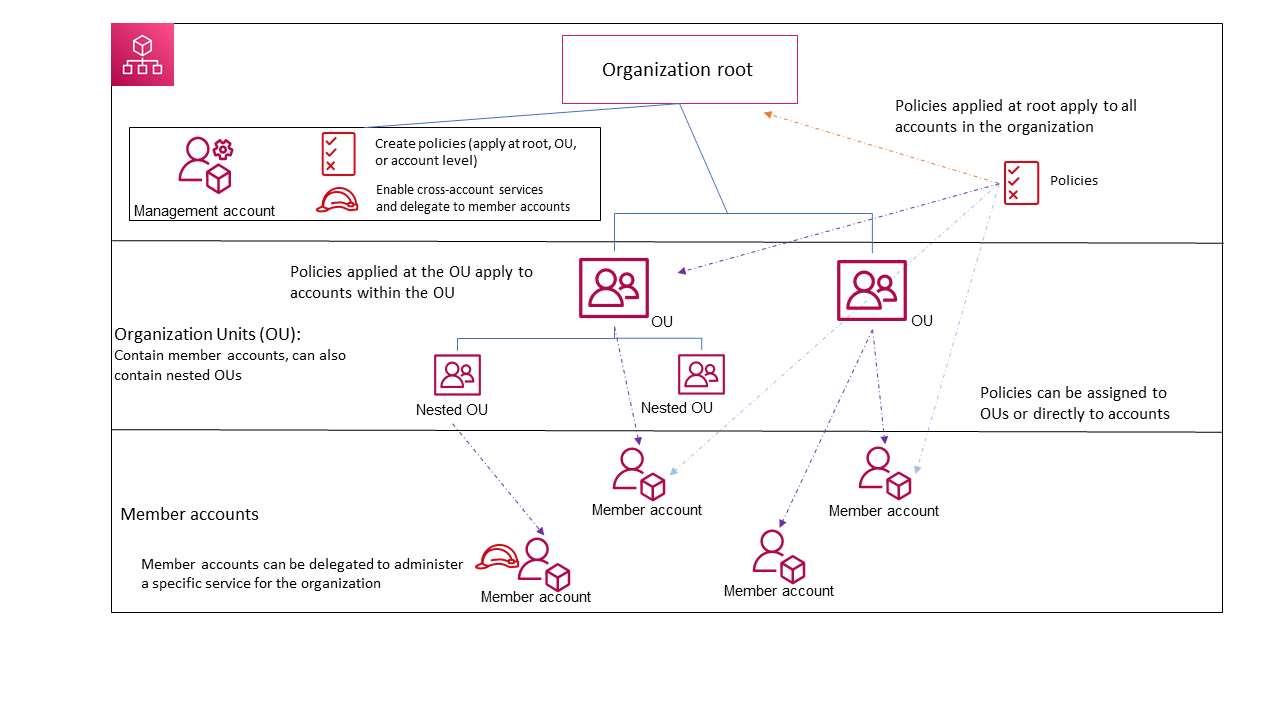
The diagram illustrates a simple organization composed of five accounts, which are grouped into four organizational units (OUs) beneath the root level. Additionally, the organization employs various policies, which are applied to specific OUs or directly to individual accounts. The image is from AWS documentation.
Note:
- AWS Organizations is a worldwide service that operates through a singular endpoint, accessible from any AWS Region. There’s no need to specifically choose a region to work within.
- AWS Organizations operates on an eventually consistent model.
- AWS Organizations is a feature included with your AWS account without any extra cost. Charges are incurred only for the use of other AWS services by the accounts within your organization.
AWS Organizations terminology
- Organization: An entitiy that allows you to centrally manage and govern your environment as you grow and scale your AWS resources
- Root: The root acts as the primary container for all the accounts within your organization. When a policy is implemented at the root level, it is enforced across all organizational units (OUs) and accounts within the organization.
- Organizational unit (OU): An OU organizes accounts into a hierarchical structure under the root, enabling centralized policy management. Policies applied to an OU affect all its accounts and sub-OUs.
- Account: An account in Organizations is a standard AWS account that contains your AWS resources and the identities that can access those resources. Do not forget that an AWS account differs from a user account. An AWS user refers to an identity established through IAM. Typically, a single AWS account will encompass numerous users and roles. In an organization, accounts are classified into two types: the management account and member accounts.
- Management Account: The management account is central, used to create the organization and perform key actions such as creating and inviting accounts, managing policies, and integrating with AWS services. It bears the financial responsibility (payer account) for all charges incurred by member accounts and cannot be changed once set.
- Member accounts constitute the remainder of the accounts within the organization. Each account can belong to only one organization and can have specific policies applied for individual control.
- Delegated administrator: It’s best to use the management account of AWS Organizations only for essential tasks and keep your AWS resources in other member accounts. This approach is recommended because security features like SCPs do not restrict any users or roles in the management account, and separating resources helps clarify billing to understand the charges on your invoices. To support this, you can assign certain member accounts as “delegated administrators” to manage specific tasks more securely and efficiently. There are two kinds of delegated administrators, organization and Service-Specific Delegated Administrator.
- Organizations Delegated Administrator: These accounts can handle organization-wide policies and apply them across different parts of the organization, such as roots, organizational units (OUs), or individual accounts. The management account has the ability to finely tune what these delegated administrators can do.
- Service-Specific Delegated Administrator: These accounts are designated to manage specific AWS services that work with Organizations. They have administrative rights for those services, alongside read-only permissions for Organizations, allowing them to oversee service integration and management within the organization’s framework. Different member accounts can be set up as delegated administrators for various services, based on the needs of the organization.
- Invitation: Invitation refers to the process where the management account of an organization invites another AWS account to join the organization. This invitation is sent to the account ID or email linked to the account being invited. Once the invitation is accepted, the invited account becomes a member of the organization. This process is particularly important when transitioning the organization to support all features, not just consolidated billing, requiring all member accounts to agree to the change. The underlying mechanism for invitations involves exchanges known as handshakes, which may not be visible in the AWS Organizations console but are essential when using the AWS CLI or Organizations API.
- Handshake: A handshake is a process that involves exchanging information in multiple steps between two parties. This mechanism is also employed when transitioning an organization from supporting only consolidated billing to embracing all features provided by AWS Organizations.
- Service control policy (SCP): A Service Control Policy (SCP) is a type of policy that defines the maximum permissions for users and roles within the accounts it impacts, regarding the services and actions they are allowed to utilize. SCPs are akin to IAM permissions policies but with a crucial distinction: they do not grant permissions. Instead, SCPs set the upper bounds of permissions across an organization, its organizational units (OUs), or specific accounts. When an SCP is applied to the organization’s root or an OU, it constrains the permissions available to the entities within the member accounts, effectively acting as a permissions boundary.
- Allow List Strategy: This approach involves specifying exactly what is allowed, automatically blocking everything else. Initially, AWS Organizations assigns a managed policy named FullAWSAccess to all roots, OUs, and accounts, ensuring full access by default. To impose restrictions, you replace FullAWSAccess with a policy that only permits a limited, specified set of permissions. This means users and roles can only access what’s explicitly allowed, regardless of their IAM permissions. Applying such a policy at the root level affects all accounts organization-wide. Since SCPs can only restrict permissions and not grant them, adding permissions back at a lower hierarchy level isn’t possible.
- Deny List Strategy: Here, you define what is not allowed, permitting everything else by default. AWS Organizations attaches the FullAWSAccess policy by default to all entities, which does not impose any restrictions from AWS Organizations itself. To restrict access, you maintain the FullAWSAccess policy but add additional policies that clearly deny access to specific services and actions you want to block. In this model, any explicit deny in a policy overrides any allow, similar to how IAM permission policies operate.
Available Feature Sets in AWS Organizations
All Features: This is the default and most comprehensive feature set in AWS Organizations, offering both the basic capabilities of consolidated billing and additional advanced controls over the organization’s accounts. With all features enabled, the management account gains extensive authority, including the ability to:
- Apply Service Control Policies (SCPs) to limit the services and actions accessible to users and roles within any account, including the root user.
- Prevent member accounts from leaving the organization without permission.
- Integrate with AWS services to extend their functionalities across all accounts in the organization.
You can start an organization with all features active or upgrade an existing organization from just consolidated billing to all features. However, activating all features requires approval from all invited member accounts, who must accept a specific invitation for the change.
Consolidated Billing: This feature set focuses on shared billing capabilities without the advanced functionalities found in the full feature set of AWS Organizations. It lacks the ability to integrate other AWS services for organization-wide functionality or use policies to control user and role actions across different accounts.
To access the advanced features of AWS Organizations, including service control and comprehensive account management, you must switch your organization to the all features set, which necessitates acceptance from all member accounts.


Use the share button below if you liked it.
It makes me smile, when I see it.