
Crossplane on Kubernetes
Crossplane is an open source framework for provisioning and consuming infrastructure in basically any cloud provider. Crossplane extends the Kubernetes API to enable cloud infrastructure management through declarative configurations (IaC). It allows developers and operators to provision and manage cloud services and infrastructure using Kubernetes-style resources and manifests, making it possible to handle the lifecycle of cloud infrastructure using the same tools and processes used for managing application workloads.
Why Kubernetes API?
Among the numerous factors contributing to Kubernetes’ popularity, the primary reason is its reconciliation loop mechanism. Kubernetes is designed around a declarative API, meaning that users define the desired state of their resources (like pods, services, deployments, etc.) and Kubernetes works to make the actual state match the desired state. The reconciliation loop is the process through which Kubernetes continuously monitors and ensures that the state of the cluster matches what has been declared by the user. Crossplane enables us to define infrastructure configurations declaratively, while also allowing Kubernetes to manage those configurations.
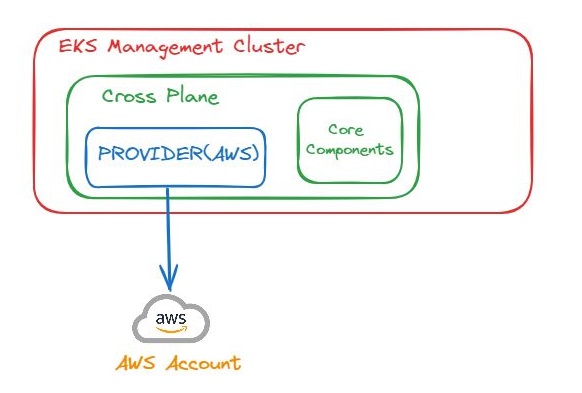
Let’s consider an example where Crossplane operates on a K8s cluster. Suppose our management cluster is an AWS EKS cluster, on which we install Crossplane. Crossplane includes core components such as CRDs, controllers, and a workload scheduler, etc. However, for Crossplane to interact with a cloud service provider which in our example will be AWS, we must add a ‘Provider’ to our cluster that connects to our cloud provider which will be an AWS account. Of course this step requires configuring credentials (such as Kubernetes secrets with AWS credentials or IAM roles for service accounts, which we’re not covering in detail here). Cloud providers offer various managed resources, the basic building blocks in Crossplane. Crossplane communicates directly with the cloud provider APIs.
Composite Resources (XR)
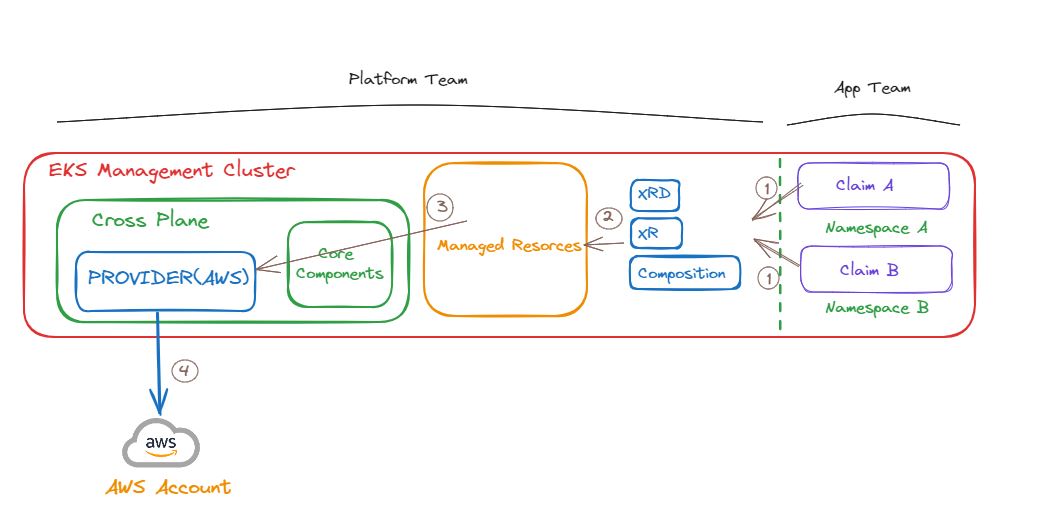
Crossplane introduces the concept of composition, which allows users to define new custom resources that are composed of other resources. This enables the creation of higher-level abstractions that encapsulate specific infrastructure patterns or configurations. In other word, Managed resources are the building blocks in Crossplane, which is designed to be composed by higher level custom resources. Crossplane calls these composite resources or XRs.
XRs are a key concept in Crossplane that enable the creation of higher-level abstractions over one or more underlying cloud infrastructure resources. This feature allows platform teams to define custom APIs that encapsulate specific infrastructure patterns, configurations, and best practices, tailored to the needs of their developers and applications. XRs are part of Crossplane’s powerful capability to extend Kubernetes API and bring Infrastructure as Code (IaC) practices closer to the Kubernetes ecosystem. XRs can be designed to be cloud-agnostic, allowing the same XR to provision resources across different cloud providers depending on the composition selected.
CompositeResourceDefinitions (XRDs)
To define a new XR, platform engineers create a CompositeResourceDefinition. This Custom Resource Definition (CRD) specifies the schema for the XR, including its configuration parameters, and serves as the template for creating instances of the XR.
Composition
Alongside the XRD, a Composition resource is defined. A Composition specifies how an XR should be fulfilled with lower-level resources. For instance, a Composition for a database XR might include the provisioning of a cloud database instance, a secret to hold connection credentials, and a firewall rule to secure access.
Resource Claims
Crossplane uses resource claims to abstract the details of specific cloud provider resources. This allows app teams to request infrastructure resources without needing to know the specifics of each cloud provider, making applications more portable. Claims abstract away even further than XRs, offering a simple and consistent interface to request cloud resources. Unlike XRs, which are cluster-scoped, Claims are typically namespace-scoped, making them accessible and manageable within the specific Kubernetes namespaces used by app teams. By using Claims, developers don’t need to know the details of the XRs or the specific cloud services being provisioned. They only need to specify their high-level requirements, and Crossplane takes care of mapping these Claims to the appropriate XRs.
Platform Teams and App Teams Responsibilities
The definition of XRs, through CompositeResourceDefinitions (XRDs), and their compositions (how XRs map to underlying cloud resources) are typically the responsibility of platform or infrastructure teams. These definitions dictate what an XR looks like and how it behaves. Platform Teams define XRDs and Compositions to create custom, reusable infrastructure abstractions. These abstractions encapsulate the specific infrastructure needs and policies of an organization, such as security, performance, and cost requirements.
On the other hand App Teams use predefined Claims to request cloud resources for their applications. These Claims are matched to XRs, abstracting away the complexity of the underlying cloud infrastructure.
Example
Imagine an organization that frequently provisions Kubernetes clusters across different environments for various projects. The platform team can define a “CompositeKubernetesCluster” XR that encapsulates all the necessary components (e.g., the cluster itself, node pools, networking configurations, and security settings). App teams can then provision a fully configured Kubernetes cluster by creating a single instance of the CompositeKubernetesCluster, without worrying about the underlying details.
Install Crossplane
- Enable the Crossplane Helm Chart repository
helm repo add \
crossplane-stable https://charts.crossplane.io/stable
helm repo update
- Install the Crossplane
helm install crossplane \
crossplane-stable/crossplane \
--namespace crossplane-system \
--create-namespace


Use the share button below if you liked it.
It makes me smile, when I see it.